
Microsoft has updated the Microsoft Certification poster and below is the latest poster.
Azure Landing Zone – Networking Overview
In this blog post, we will be going through the networking overview of the Azure Landing Zone.
Networking Decision Guide
The below network decision tree should be used as a starting point to determine the network services that should be used.
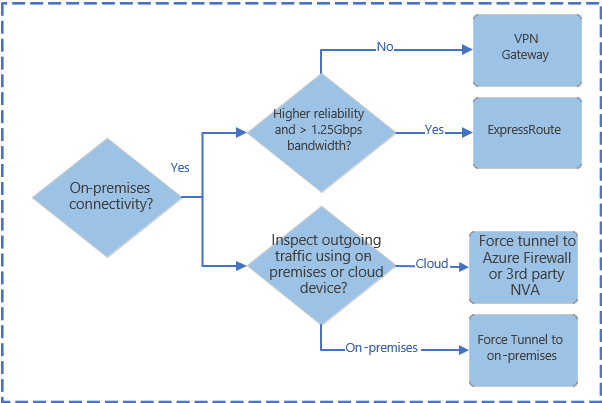


Consider the following design elements:
Below are the design consideration for Azure networking and connectivity.
- Planning for IP Addressing
- Configure DNS
- Define an Azure Networking Topology
- Connectivity to Azure
- Connectivity to other cloud providers
Planning for IP Addressing
IP address planning is a vital first step when designing a network in Azure especially if you have a hybrid environment to avoid overlapping IP address space across on-premises environment and Azure.
Design Considerations:
- Azure reserves 5 IP address with each subnet so factor in the address space when sizing the virtual networks.
- Some Azure service such as Application Gateway – WAF, Azure Firewall, Azure Bastion and VPN Gateway require dedicated subnets.
- You can delegate subnets to some Azure service that can be injected into the virtual network.
Design Recommendation:
- IP address space should not overlap the on-premises environment.
- Use the non-routable, private address spaces.
- 10.0.0.0 – 10.255.255.255 (10/8 prefix)
- 172.16.0.0 – 172.31.255.255 (172.16/12 prefix)
- 192.168.0.0 – 192.168.255.255 (192.168/16 prefix)
- You cannot add the following address ranges:
- 224.0.0.0/4 (Multicast)
- 255.255.255.255/32 (Broadcast)
- 127.0.0.0/8 (Loopback)
- 169.254.0.0/16 (Link-local)
- 168.63.129.16/32 (Internal DNS)
- Plan for future growth since adding address space can cause an outage.
- Public IP addresses should not be used for virtual networks.
Domain Name System (DNS)
Since DNS is a critical part of networking, some companies may use their exisiting DNS solution and other may adopt native Azure capabilities.
Design Considerations:
- The maximum number of private DNS zone, which can be linked to a virtual network with auto-registration is one.
- Be aware of the Azure Private DNS zone limits.
Design Recommendation:
- Use Azure DNS zones for Azure related name space resolutions.
- In a mix environment (Azure + on-premises environment), use exiting DNS services such as Active Directory integrated DNS.
- If the Azure environment is running Azure Firewall, then DNS Proxy should be evaluated.
Azure Networking Topology
Azure Virtual WAN is a Microsoft managed solution that provided end to end global and dynamic transit connectivity.
Virtual WAN simplifies end to end network connectivity from on-premises to Azure and within Azure by creating a hub and spoke network architecture.
Virtual WAN network topology.

A traditional Azure network topology.

Connectivity to Azure
Design Considerations:
- Azure ExpressRoute private connectivity to Azure infrastructure since the traffic is not going through the internet.
- Private Link can be established for connectivity to Azure platform as a service (PaaS) over ExpressRoute with private peering.
Design Recommendation:
- ExpressRoute should be used as the primary connection for connecting an on-premises environment to Azure. Furthermore, site to site VPN can be used as a backup connectivity.
- Using a single ExpressRoute connection is the singe point of failure so use dual ExpressRoute circuits.
- ExpressRoute/VPN Gateway come in various SKUs so choose the right SKU based on the requirements.
Connectivity to other cloud providers
Follow the below cross-cloud connectivity flow chart for choosing an option.
Option 1 – Customer manages routing.
Option 2 – A cloud exchange provider manages routing.
Option 3 – Use site to site VPN.

Design Considerations:
- Azure virtual network can only be connected to another cloud provider’s virtual private cloud (VPC) if the private IP addresses do not overlap.
- Site to site VPN have lower throughput and higher latency than ExpressRoute.
- Design Recommendation:
- If you do not want to use public internet, then choose option 1 and 2.
- If ExpressRoute is not available, you can use site to site VPN with traffic going through the internet for the connection between Azure and cloud provider.
This wraps up the Azure Landing Zone – Networking Overview.
Azure Landing Zone Overview
Azure landing zone, which is a subset of Microsoft Cloud Adoption Framework for Azure, help customers set up their Azure environment for scale, security, governance, networking, and identity.

Azure Subscription
Once you create an Azure tenant, the next step is to create a subscription(s). You might be thinking, ‘how many subscription(s) do I need’? This really depends on many factors so lets take a look at it.
Azure subscriptions have different limits for different resource types and this link does a great job of explaining the different service limits, quotas, and constraints.
Items to look at when designing the subscription model:
Technical Requirements
•Network Connectivity (shared or dedicated)
•Active directory requirements, clustering, identity, management tools
Security Requirements
•Who are the subscription administrators
•Least privilege model
Scalability Requirements
•Growth plans
•Allocation of limited resources
•Evolution over time (users, shared access, resource limits)
Here are some questions that should be asked before creating a subscription:
•Who will be responsible for creating subscriptions?
•What resources will be in a subscription by default?
•Are there any capacity / technical limitations?
•Do we want to ensure Separation of duties?
•Dev/Test Vs. Production?
•Different end customers?
•Different departments or business units?
•Different projects?
•What is the right naming convention to be used? Here is a great article on naming convention.

Azure Resources

Once the Azure subscription(s) are setup, the next step is to think about how to organize the Azure resources.
Azure Management group

Define the management group hierarchy on organization and environment type such as production, dev/test etc.
The root management group is for global configuration and be careful with the management level assessments as they will cascade through the hierarchy. Assign common polices and RBAC on the management group level.
The built-in RBAC roles for management group are MG contributor and MG reader.
Azure Role-Based Access Control (RBAC)

Using RBAC, you can segregate duties within your team and grant only the amount of access to users that they need to perform their jobs. Instead of giving everybody unrestricted permissions in your Azure subscription or resources, you can allow only certain actions at a particular scope.
- Security principal
A security principal is an object that represents a user, group, service principal, or managed identity that is requesting access to Azure resources.
– Service principal – A security identity used by applications or services to access specific Azure resources. You can think of it as a user identity (username and password or certificate) for an application. -Managed identity – An identity in Azure Active Directory that is automatically managed by Azure. You typically use managed identities when developing cloud applications to manage the credentials for authenticating to Azure services.
2. Role definition
A role definition is a collection of permissions. It’s sometimes just called a role. A role definition lists the operations that can be performed, such as read, write, and delete. Roles can be high-level, like owner, or specific, like virtual machine reader. You can create custom roles if none of the existing built-in roles don’t meet the specific needs of your organization.
3. Scope
Scope is the boundary that the access applies to. When you assign a role, you can further limit the actions allowed by defining a scope. This is helpful if you want to make someone a Website Contributor, but only for one resource group.
Azure Tags
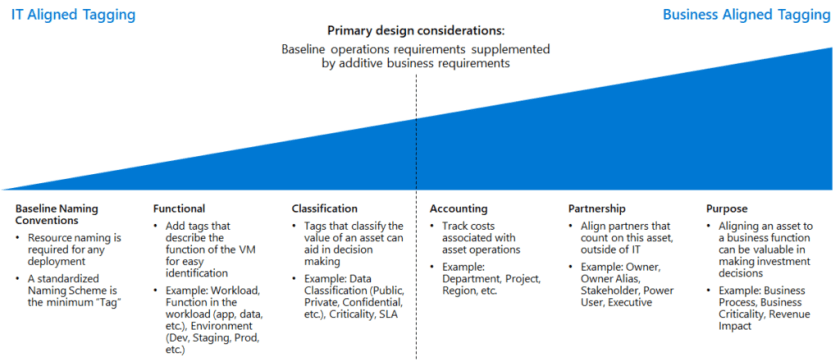
Here is the Azure tagging decision guide. Here is the link for best practices on using Resource Tags.

Azure Policy

Azure policy can enforce real time policy and at-scale compliance assessment. Also, the policy evaluates all Azure resource and can generate events that can be used for alerting. Furthermore, Azure policy can be used to automatically remediate problem in the environment.
My recommendation is to start with audit policies, which is a safe way of understanding what a policy will do without affecting the user activity. Furthermore, deny policies should be rolled out in stages to understand the impact.
This wraps up the Azure Landing Zone Overview.